


An exciting transformation awaits you in our revamped Analytics section. Similar to file folders, you can access analytics by using the dropdown menu or simply double-clicking on the schedule file. The analytics dashboard now consolidates data, cash flow, cost, and detailed information, providing a comprehensive view in one centralized location. Check out our video tutorial here.
Navigating the Analytics Dashboard:
- Gauge Icon: A new gauge icon on the left represents the currently open analytics. Click on any other sidebar buttons to explore different analytics; the gauge icon retains the last open analytic file. The lower right-hand side is now designated for open temporary files.
Overview Tab:
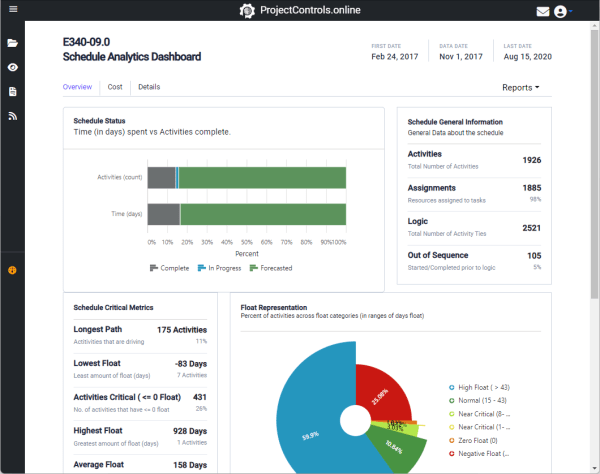
- The first and landing tab, “Overview,” offers a general snapshot of the schedule analytics, designed to help users understand the major components shaping the schedule.
Cost Tab:
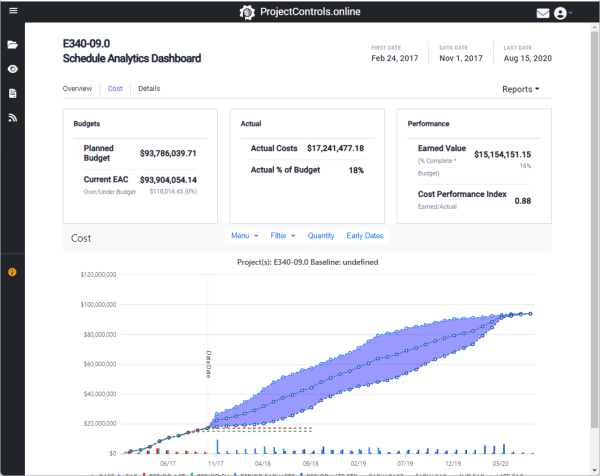
- The “Cost” tab is a comprehensive resource for both cost and cash flow information. The cash flow section includes multiple menus, initially displaying both early and late date cost information. Through the menu, users can opt for early dates or quantities only. Cash flow data is downloadable in various formats, with several filters available for customization.
Details Section:
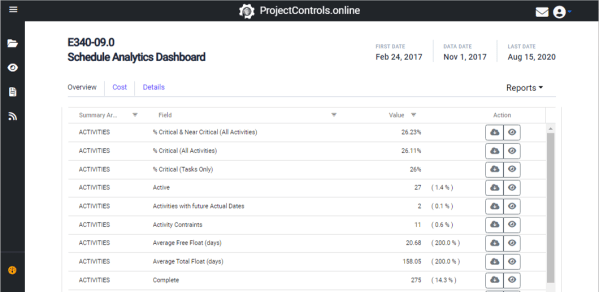
- For advanced users seeking granular insights, the “Details” section provides in-depth analytics. The list allows for easy filtering and sorting of datasets based on user preferences. Data can be viewed online or downloaded into Excel for thorough review.
Reports Dropdown:
- On the right-hand side, the “Reports” dropdown presents a range of downloadable reports. These reports, mostly Excel-based, include DCMA as a Word report. Stay tuned for upcoming report improvements as part of our scheduled file import enhancements.
This revamped Analytics section is designed to empower users with a user-friendly, all-encompassing dashboard. As we continually enhance our system, expect even more powerful features and insights in future updates.
 ProjectControls.online
Leave a comment