

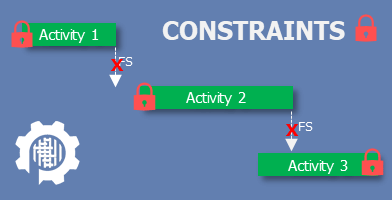
In our commitment to advancing the practice of scheduling, we at ProjectControls.online feel compelled to address one of the most common and damaging issues with project schedules, the misuse of Constraints. In this article, we review the types of constraints, how MS Project and Primavera P6 identify them, and best management practices for their application.
Overview
CPM scheduling is a powerful technique to model the dynamic nature of a project through logic, dependencies, and durations. As outputs, a CPM schedule provides the timing and flexibility of activities through calculated activity dates (early and late start; early and late finish) and float. Total Float is the calculated time an activity can be delayed without delaying the final completion of the project; Free Float is the calculated time an activity can be delayed without delaying any other activity. Constraints force dates into a CPM as inputs, which can significantly influence and jeopardize the integrity of the calculated schedule, including the accuracy of the total and free float.
A trend among many amateur schedulers and project managers is to “fix” the dates of activities using constraints, in lieu of letting the schedule software calculate them. This denies the CPM schedule of its most important asset—logic. For example, we see constraints used to assign start dates to activities, like “Start Painting”, who have logical predecessors, like “Finish Drywall”. A constrained date, with the absence of logic, removes the effect of a potential delay to the predecessor on its natural successor. Bottom Line: logic is dynamic; constraints are not.
Why Constraints exist?
Allowing the schedule to be logic-driven is preferred; but constraints do have a role in a schedule. Constraints can impose deadlines (like interim and completion milestones) or capture external influences on the schedule that are based on dates and not logic, such as funding availability, permit approvals or a third party resource. Using constraints in combination with logic presents two situations that define the two categories of constraints:
- Hard Constraints: when we want the constraint date to override the logic
- Soft Constraints: when we want to default to the logic first, before the constraint date
Constraints in general should be used sparingly, allowing for task dates to result from dependencies and activity duration. Most often Soft Constraints are preferred because they allow the schedule to continue to be logic driven. By contrast, Hard Constraints artificially prevent the schedule from shifting to the right. This has the potentially disastrous effect of obscuring the possibility of late performance before it is too late to take corrective action.
Constraint Types
Within the two categories, there are several constraint types for specific situations, that Primavera P6 and Microsoft Project give different names. The tables below describe each type of constraint and how it is calculated. For reference, here is a quick list of the abbreviations used in the calculations:
| CD = Constraint Date | |
| ES = Early Start | LS = Late Start |
| EF = Early Finish | LF = Late Finish |
Start Constraints
| Primavera P6 | Microsoft Project | Calculation |
| default | As Soon As Possible | ES = ES |
| Schedules the task to start as early as it can. Uses no constraint date. In Primavera P6, this is the default calculation and requires no constraint selection. | ||
| Start On or After | Start No Earlier Than | If CD < ES, then ES = CD, else ES |
| Limits the earliest time an activity can begin. When calculating a schedule, this constraint is used in the forward pass only if the calculated early start date will be earlier than the imposed date. This constraint only affects early dates. The early start date of an activity with this constraint cannot be earlier than the imposed date, although the network logic may cause the early start to occur later. | ||
| Start On or Before | Start No Later Than | If CD < LS, then LS = CD, else LS |
| Limits the latest date an activity can start. When calculating a schedule, this constraint is used in the backward pass only if the calculated late start date will be later than the imposed date. This constraint may decrease total float. It only affects late dates. | ||
| Start On | n/a | ES = CD, LS = LS |
| Imposes a start date that can delay an early start or accelerate a late start to satisfy the imposed date. Unlike the Mandatory Start constraint, which can violate the network logic, this constraint protects it. | ||
| Mandatory Start | Must Start On | ES = LS = CD |
| Sets an activity’s early and late start dates equal to the constraint date. The mandatory early start date is used regardless of its effect on network logic. A mandatory early start date could affect the late dates for all activities that lead to the constrained activity and all early dates for the activities that lead from the constrained activity. | ||
Finish Constraints
| Primavera P6 | Microsoft Project | Calculation |
| As Late As Possible | As Late As Possible | ES = LS, EF = LF |
| On an activity with positive float, allows it to start as late as possible without delaying its successors. This constraint sets the early dates as late as possible without affecting successor activities. | ||
| Finish On or After | Finish No Earlier Than | If CD < EF, then EF = CD, else EF |
| Limits the earliest time an activity can complete. This constraint reduces float to coordinate parallel activities, ensuring that the finish of an activity is not scheduled before the specified date. It is usually applied to activities that have few predecessors that must finish before the next phase of a project. | ||
| Finish On or Before | Finish No Later Than | If CD < LF, then LF = CD, else LF |
| Limits the latest time an activity can be finished. The finish on or before constraint affects only late dates. Use this constraint to ensure that the late finish date of an activity is not later than the date you impose. | ||
| Finish On | Deadline | ES = ES, LF = CD |
| Imposes a finish date. The finish on constraint can delay an early finish or accelerate a late finish to satisfy the imposed date. | ||
| Mandatory Finish | Must Finish On | EF = LF = CD |
| Sets an activity’s early and late finish dates equal to a specified date. The mandatory finish date is used regardless of its effect on network logic. This constraint affects the late dates for all activities that lead to the constrained activity and all early dates for the activities that lead from the constrained activity. | ||
The information in the tables above is a great reference but might not clearly showcase the differences between the constraints. The Figures below compare similar constraints with a brief discussion of how they differ. (Note: Primavera P6 naming convention is used in these figures)
As Soon As Possible vs. As Late As Possible
| The As Soon As Possible constraint only exists in Microsoft Project; in P6, this calculation method is by default when no constraint date or type is applied. The As Late As Possible constraint uses the available total float of an activity, without affecting any succeeding activities. |
 |
Start On or After vs. Start On or Before
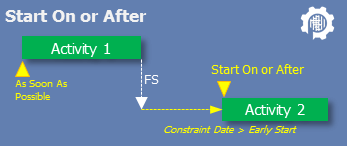
| Both of these are considered soft constraints, because the calculations default to the logic until the constraint date is invoked, conditionally. Using Start On or After, the activity early start is overridden by the constraint date only if the constraint date exceeds the calculated early start. Use when an external influence defines an “earliest possible start”. |
 |
| Using Start On or Before, the activity early start is overridden by the constraint date only if the constraint date is less than the calculated early start. Use when an external influence defines a “latest possible start”. |
 |
Start On vs. Mandatory Start
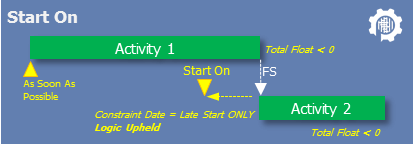
| The Start On constraint is unique to Primavera P6 for float calculations. Use this soft constraint to uphold schedule logic despite the constrained activity and its predecessor(s) showing a negative total float. |
 |
| Using a Mandatory Start invokes a hard constraint that defines the constraint date as both the early and late start dates. Use sparingly when an external influence defines an “exact and immovable” start date. |
 |
Finish On or After vs. Finish On or Before
| Both of these are considered soft constraints, because the calculations default to the logic until the constraint date is invoked, conditionally. Using Finish On or After, the activity early finish is overridden by the constraint date only if the constraint date exceeds the calculated early finish. Use when an external influence defines an “earliest possible finish”. |
 |
| Using Finish On or Before, the activity early finish is overridden by the constraint date only if the constraint date is less than the calculated early finish. Use when an external influence defines a “latest possible finish”. |
 |
Finish On vs. Mandatory Finish
| The Finish On concept is represented as a constraint in Primavera P6 and as a “Deadline” in MS Project, both for float calculations. Use this soft constraint to uphold schedule logic despite the constrained activity and its predecessor(s) showing a negative total float. |
 |
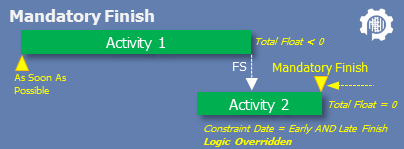
| Using a Mandatory Finish invokes a hard constraint that defines the constraint date as both the early and late finish dates. Use sparingly when an external influence defines an “exact and immovable” finish date. |
 |
DCMA
In a previous article, Understanding Schedule Analytics | DCMA 14-Point Assessment, we introduced the industry-standard evaluation of schedule quality and health. The DCMA threshold for hard constraints is that no greater than 5% of incomplete activities in the schedule should use them. However, this is an area where an organization may choose to impose limits that are more restrictive. Ideally, there should be no hard constraints in a schedule. To represent hard dates, we strongly suggest using deadlines and finish on constraints, allowing the schedule to forecast late delivery early while it is still possible to correct it.
Summary
CPM scheduling is a powerful method to model the dynamic nature of a project through logic, dependencies, and durations. One product of a CPM Schedule is activity dates. Constraints force dates into a CPM as inputs, which can significantly influence and jeopardize the integrity of the calculated schedule, including the accuracy of the calculated total and free float. In this article, we reviewed the types and uses of constraints to advance the practice of their appropriate application in schedules. In general, constraints should not replace logic or activities that is inherent to the schedule. We strongly encourage a minimal use of soft constraints and rare use of hard constraints, only when absolutely necessary and appropriate. ProjectControls.online can help you find and mitigate these to ensure a better schedule.
If you have questions or comments, don’t hesitate to contact us at admin@projectcontrols.online.
 ProjectControls.online
Leave a comment