


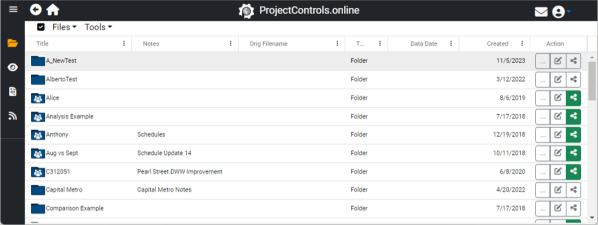
Welcome to the revamped ProjectControls.online (PC.o), where a more intuitive, efficient, and swift user experience awaits you! The latest redesign introduces a sidebar, offering seamless navigation between key areas and highlighting your current location.
The Major Areas: Simplifying Your Journey

- CPM Files Section (Folder Icon): Dive into your CPM files (P6 and Microsoft Project) effortlessly. Upload, view analysis, compare, and more within this centralized hub for all your CPM files.
- Excel Look Ahead Files (Eye Icon): The “eye” icon houses your Excel Look Ahead files. Import multi-week look ahead files in Excel, compare them, and align multiple look aheads with schedules seamlessly.
- Comparison Reports (Reports Icon): The “reports” icon centralizes all the comparison reports generated in the CPM files section. Conveniently view and download all the reports for a comprehensive project overview.
- Educational Resources (RSS Icon): Access a curated list of instructional videos and blogs, offering guidance on using PC.o and valuable scheduling insights. Whether you seek PC.o instructions or general scheduling tips, this icon is your gateway.
Enhanced Sidebar Dynamics: Streamlining Your Workflow
The lower half of the sidebar dynamically adjusts as you open analysis, comparison, and look ahead editors. Swiftly move between existing structures and the latest opened files and reports. The sidebar serves as your efficient compass, guiding you through the PC.o experience seamlessly.
Embrace the future of project management with ProjectControls.online’s redesigned sidebar – where simplicity meets enhanced functionality. Your journey to intuitive project control starts here.
 ProjectControls.online
Leave a comment