


We’re thrilled to introduce our new way to manage your subscriptions that launched with our last update on ProjectControls.online! Whether you’re an individual user or part of a group, our upgraded subscription system is designed with you in mind. Today, we’ll focus on how you can easily manage your Individual subscription—making it smoother than ever to handle your billing and invoices.
A Smarter Way to Manage Your Subscription
Our new system allows you to manage your subscription faster and more efficiently than before. Need to forward your invoice to your company for payment? No problem! Want to grab a receipt for reimbursement? We’ve got you covered! And, with your security in mind, no payment information is stored on our site, so you won’t have to worry about any company details being visible. All you’ll find are your receipts and outstanding payments, making it easy to keep track of everything without the hassle.
Getting Started: Your Account Manager
It all starts by creating your account (check out our guide on how to create an account here). Once you’re logged in, head to the upper-right corner of the page, click on your user icon, and select “Account.” This will open your Account Manager, where the magic happens!

Here’s a sneak peek of what you can manage:
- General Information: Update your email, name, and password.
- Subscriptions: View and manage your subscription.
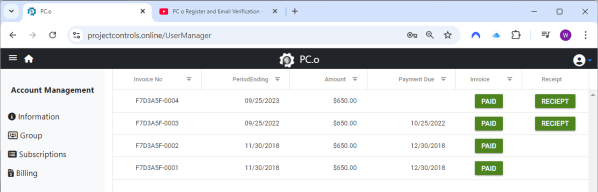
- Billing: Access all your invoices, both paid and outstanding.
How to Start Your Subscription
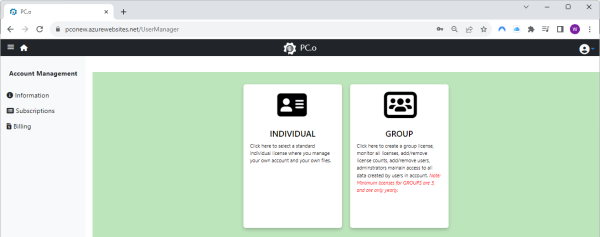
Ready to subscribe? It’s simple! Just head to the “Subscriptions” section in your Account Manager and select “Individual.”
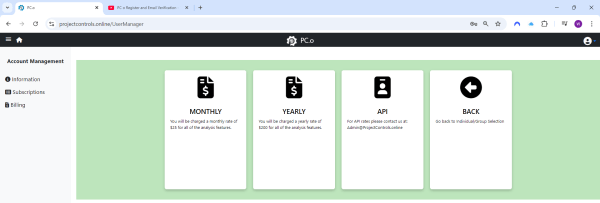
From there, you’ll be prompted to choose your subscription type—Monthly, Yearly, or an API email notification.
Once you’ve selected your type, an invoice will be generated and sent to your inbox (this may take up to an hour, so hang tight!). After receiving the email, just follow the link to complete your payment.
If you’re ever wondering about the status of your invoice or can’t find the email, hop over to the Billing section. You can download outstanding invoices, check on any historical payments, and even send invoices directly to your company’s accounts for processing.
Managing Company Payment and Reimbursement
One of the standout features of our new subscription system is the flexibility it provides for users working with their companies on payments. If your company is covering your subscription costs, you can easily forward the invoice directly to them. The process is seamless—no need to worry about storing sensitive payment information on our site. Simply forward the invoice email you receive, and your company can take care of the rest.
For those who need to seek reimbursement, ProjectControls.online makes it hassle-free. Just download your invoice and receipt from the Billing section, submit it to your company’s reimbursement portal, and you’re all set. We store all invoices—paid, outstanding, and cancelled—so you’ll always have access to the documents you need.
This new system is all about helping you streamline your subscription payments, whether you’re handling them personally or working with your company. It’s designed to make your life easier, reduce paperwork headaches, and keep everything organized in one place.
Cancelling Your Subscription
We hope you’ll love our service, but if you ever need to cancel your subscription, we’ve made it just as easy! Head back to the Subscriptions tab, click “Cancel,” and you’ll retain access to your subscription through the end of your current paid period.
Need Help?
We’re always here for you! If you have any questions or run into any issues, don’t hesitate to reach out at admin@projectcontrols.online. We’re happy to help and make sure your experience with ProjectControls.online is seamless.
Happy managing!
 ProjectControls.online
Leave a comment